




Track MSC container ships with ShipFinder to check their latest reported positions, routes and ETAs. Search by vessel name, IMO number or MMSI, enable satellite AIS tracking for offshore voyages, and set email alerts for key vessel events.
This guide focuses on MSC container ships, with practical steps for shippers, freight forwarders and maritime professionals.
MSC Ship Tracking or Container Tracking: Which Do You Need?
Container tracking follows a specific shipment. Use MSC's official tracking service with your shipment or container number to check its latest recorded status. If you need to identify the carrying vessel, check your shipment records or ask your freight forwarder.
Ship tracking follows the vessel itself. Once you know its name, IMO number or MMSI, use ShipFinder to check its latest reported position, destination and ETA, then compare these details with your shipping schedule.
Use both sources when planning transport. A vessel’s arrival does not confirm that your container has been discharged or released for collection; check the relevant carrier or terminal records before making pickup arrangements.
What to Look for in an MSC Vessel Tracking Service
For regular monitoring, consider what you need beyond a position marker.
Report timestamps: You should be able to see when a position was reported.
Coastal and offshore tracking: Check whether satellite AIS is available and how to enable it.
Voyage information: Destination, ETA, historical tracks and port calls help put the latest position in context.
Event alerts: Notifications can reduce the need to keep checking the map.
Fleet management: A saved vessel list makes recurring checks easier when you follow several ships.
ShipFinder brings these functions together on its web platform.
For container status, continue using MSC's shipment records alongside the vessel map. Each service answers a different part of the journey.
How to Track an MSC Ship with ShipFinder
Step 1: Confirm the Vessel Name, IMO Number or MMSI
Start with the vessel assigned to the current leg of your shipment. Check MSC's shipment information, your shipping documents or updates from your freight forwarder.
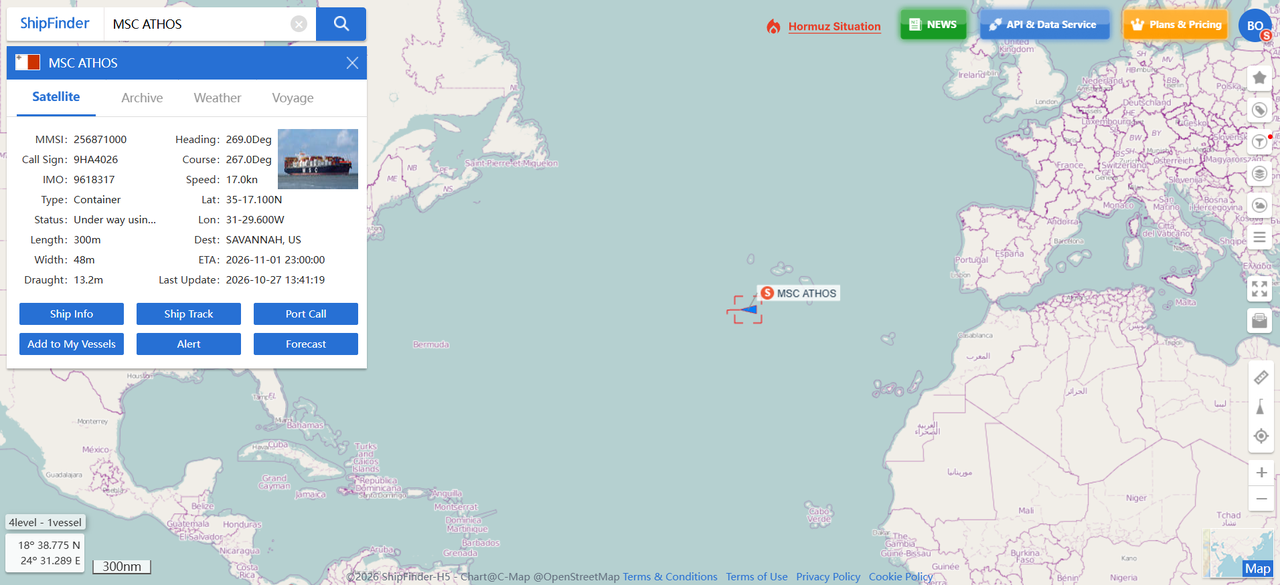
Open ShipFinder and search by vessel name, IMO number or MMSI. Select the matching result and verify its identifiers, especially if several names look similar.
If your shipment involves transshipment, confirm the onward vessel before changing your monitoring list. Following the original ship after your container has transferred will no longer show the relevant voyage.
Step 2: Check the Latest Position, Destination and ETA
Check the vessel information card for the ship's latest reported position, speed and course. Read the position alongside its timestamp to see how recent the report is.
Review the destination and estimated time of arrival (ETA), then compare them with your shipping schedule. Confirm which port the ETA refers to, as it may differ from your container's discharge port.
Step 3: Review Historical Tracks and Port Calls
Check recent port calls and the recorded route to understand the movements leading up to the latest position.
Historical tracks can show the route sailed since departure, while port call records provide context about previous stops. Playback lets you replay the vessel's recorded movements.
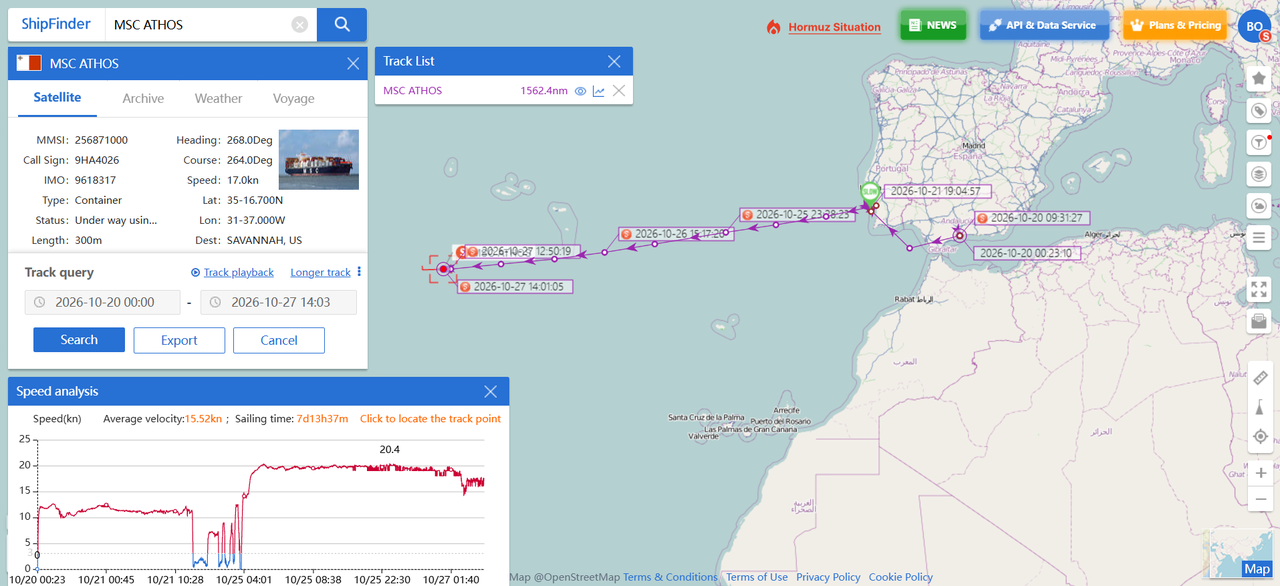
MSC Vessel Historical Tracks
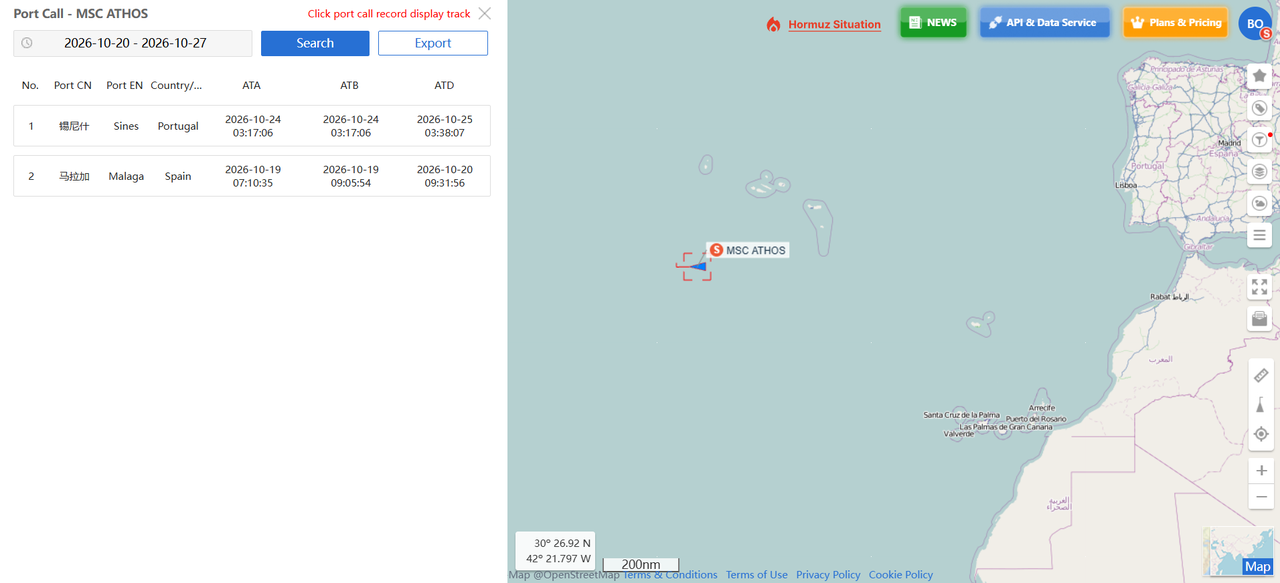
MSC Vessel Port Calls
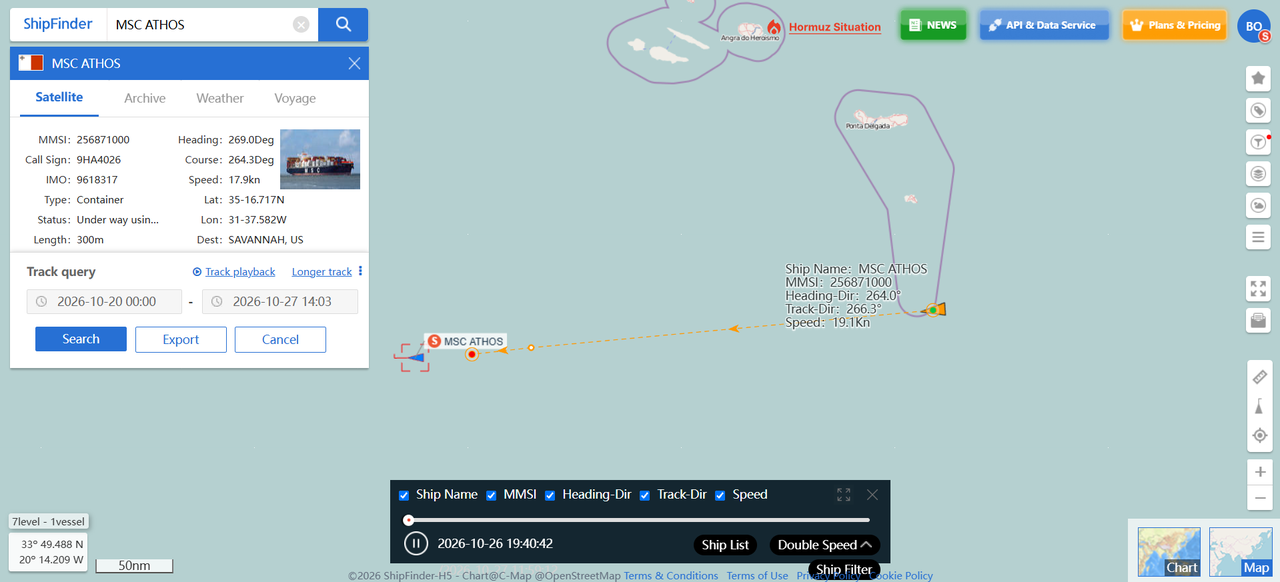
MSC Vessel Track Playback
Step 4: Enable Satellite Tracking for Offshore Voyages
Shore-based AIS receivers support tracking within coastal coverage. Satellite AIS provides another source of position reports when vessels sail offshore.
To receive satellite updates in ShipFinder, make sure your account has an available satellite tracking slot, then add the vessel to satellite tracking. Otherwise, your account may continue to display its last terrestrial AIS position.
The free Basic plan includes satellite AIS tracking for one designated vessel. See the ShipFinder plan comparison for additional satellite tracking capacity and longer historical records.
Monitor MSC Vessel Movements with Alerts and Fleet Management
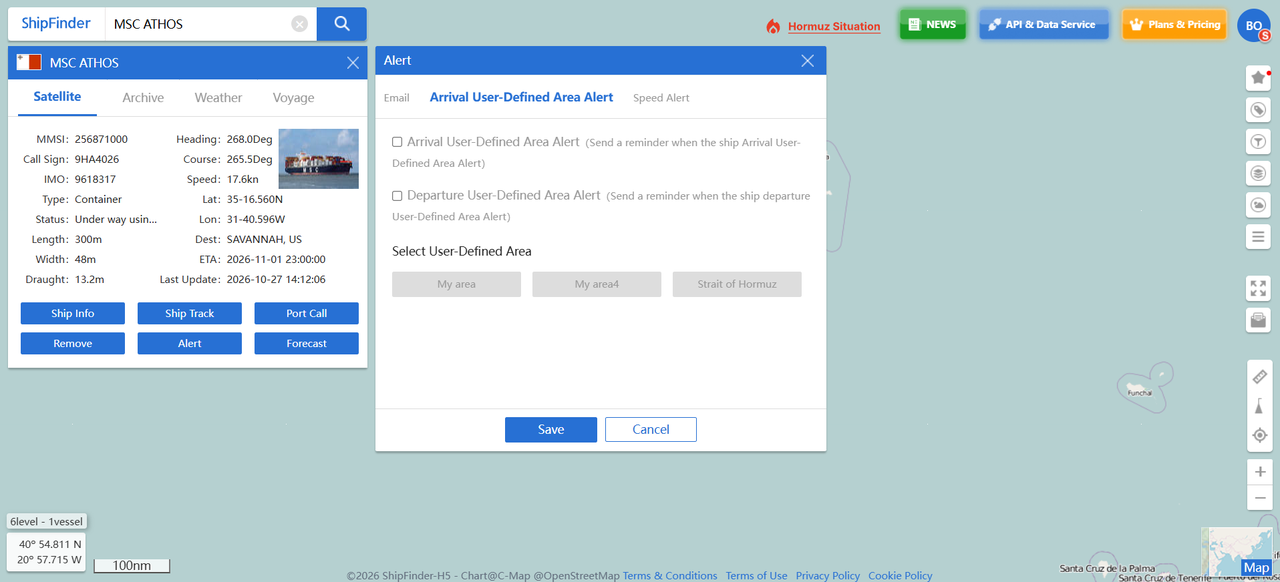
Set Alerts Around the Events You Follow
Set up email alerts for relevant vessel activity, such as arrivals, departures, area entry or exit, and speed changes. Choose the events that matter to your work and configure the notification email address.
For example, an area-entry notification can prompt you to review a vessel approaching a port. Check its latest position and voyage information before updating operational arrangements.
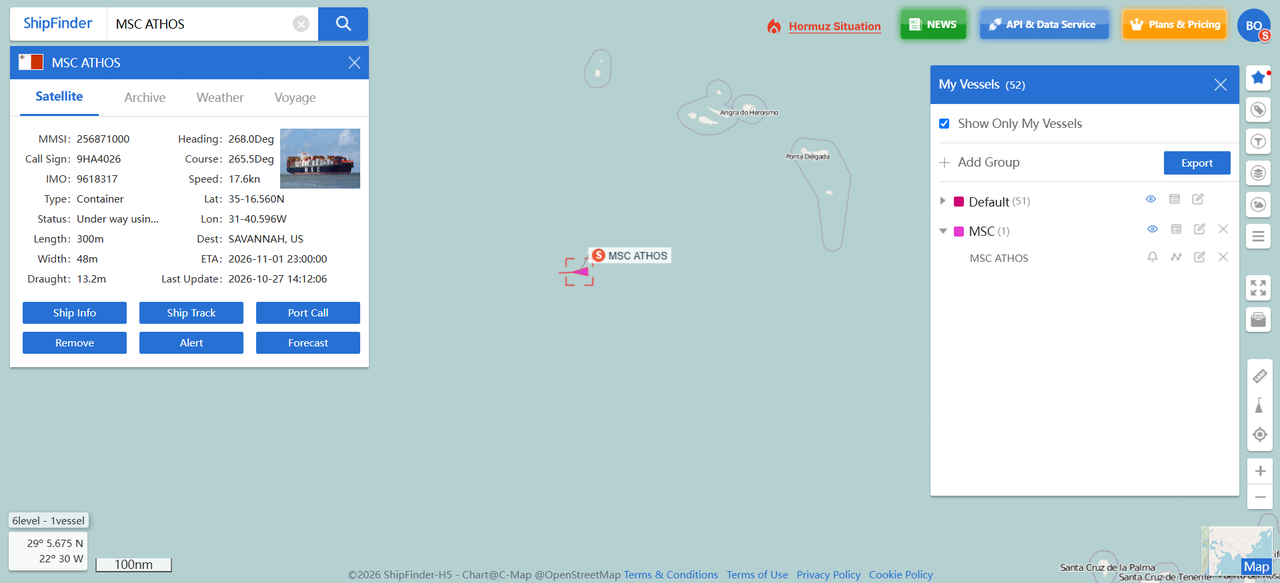
Keep Relevant Vessels in a Fleet
If you follow several MSC vessels, add them to a fleet so you can return to their positions without repeating individual searches. Keep the list aligned with current shipments or voyages, updating it when vessel assignments change.
What to Check If an MSC Vessel's Position Has Not Updated
An unchanged position does not necessarily mean the ship has stopped or the voyage is delayed.
Check the report timestamp: Establish how old the displayed position is.
Review satellite tracking settings: If the vessel is offshore, confirm that it has been added to satellite tracking and your account has sufficient capacity.
Consider data availability: AIS transmission intervals, receiver coverage, signal reception and data delivery affect when new reports appear.
If you need to confirm a change to your shipment schedule, check with MSC or your freight forwarder as well.
Start Tracking an MSC Vessel
Open ShipFinder to search for an MSC vessel and review its latest position, destination and ETA. Create a free account to explore ongoing monitoring tools and activate satellite AIS tracking for one designated vessel.
FAQ
How can I track an MSC ship in real time?
Search ShipFinder by vessel name, IMO number or MMSI. Open the matching vessel to view its latest available AIS position, report time, destination and ETA.
Can I search for an MSC vessel using a container number?
ShipFinder's vessel search uses ship names, IMO numbers or MMSIs. If you only have a container number, check MSC's shipment records or ask your freight forwarder to identify the carrying vessel first.
Can I track MSC ships offshore?
Yes. Satellite AIS supports offshore tracking. Add the vessel to satellite tracking and confirm that your account has an available slot to receive its available satellite reports.
Is MSC ship tracking free on ShipFinder?
Yes. You can search for MSC vessels and check their positions for free. A free Basic account also includes three days of historical tracks, satellite AIS tracking for one designated vessel and fleet management for up to 10 vessels.
Can I receive alerts for an MSC vessel's movements?
Yes. ShipFinder supports email alerts for vessel events, including arrivals, departures, area entry or exit, and speed changes. Select the relevant events and configure your notification email address.