



A change in a vessel's destination or ETA can affect the plans of shipowners, operators and charterers. Keeping track of these changes across a fleet takes time, particularly when teams check vessels individually and share updates manually.
ShipFinder helps teams monitor ship movements in real time, follow voyage progress and receive alerts for relevant events. Use the online platform to keep track of your fleet, or connect vessel data to your internal systems through the AIS API.
What Commercial Fleet Teams Need to Monitor
For day-to-day operations, fleet teams need a clear view of vessel movements and changes that may affect their plans:
Where are our vessels now?
Have their destinations, ETAs or voyage plans changed?
How can we receive updates on key vessel events?
ShipFinder helps your team stay informed and follow up on the vessel activity that matters.
Set Up a Fleet Monitoring Workflow in ShipFinder
Organize the Vessels You Monitor
Build your monitoring list around the ships relevant to your current work. Add those vessels to a fleet and update the list as your responsibilities change. This makes it easier to check the ships you need without searching for each one individually.
For setup instructions, see our guide to creating a fleet.
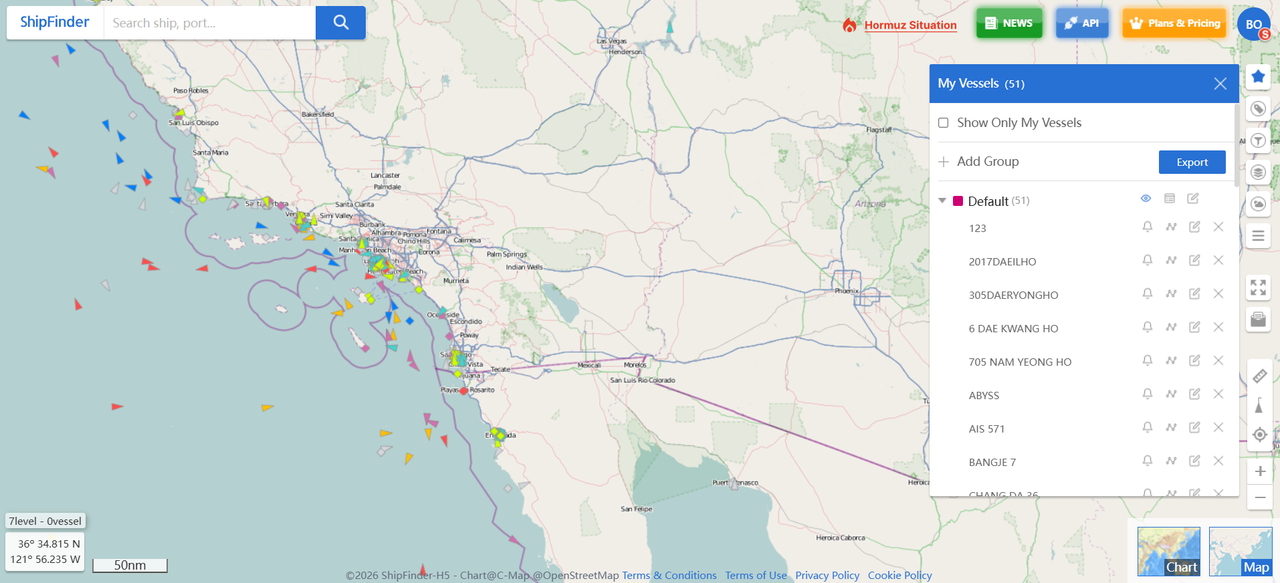
Review Vessel Positions and Voyage Progress
Check each vessel's latest reported position and timestamp, along with its speed, course, destination and ETA. Review recent port calls and historical tracks for context on its current voyage.
Set Alerts for the Events That Matter
Set up alerts for the vessel activity your team needs to follow, and add an email address for notifications. Relevant updates can then reach the people responsible for follow-up, reducing the need for repeated map checks.
Single-Vessel Alerts
Speed alerts: Receive notifications of speed changes and check whether the vessel’s progress needs closer attention.
Area arrival or departure alerts: Know when a selected vessel enters or leaves an area of interest, helping your team follow its progress and coordinate the next steps.
For setup instructions, see the vessel alert guide.
Manage Alerts for Multiple Vessels
Destination and ETA Alerts:
Keep track of destination and ETA updates across multiple vessels.
Destination alerts are available on the Professional plan and are currently set up by the ShipFinder support team. Receive notifications when:
A selected vessel reports the destination you specify.
A vessel in your monitored fleet is bound for a selected destination port.
Contact our support team at shipfinder@elaneglobal.com to set up alerts for the vessels and ports you want to follow.
Area alerts: Receive notifications for vessels detected entering or leaving a selected area, including ships outside your fleet.
Improve Fleet Monitoring with the ShipFinder AIS Data API
If your team works primarily in an internal voyage system or operations dashboard, the ShipFinder API can bring vessel data into that workflow.
Create an API Key and Test the Data
Sign in to the API Console and create a Starter Key for initial testing.
The Starter Key provides a 14-day trial of five fixed endpoints: Vessel Position, Vessel Search, Vessel History Track, Vessel Flag Information and Port Information. Each has a usage limit; the trial does not include every API or push service. View the Starter trial details.
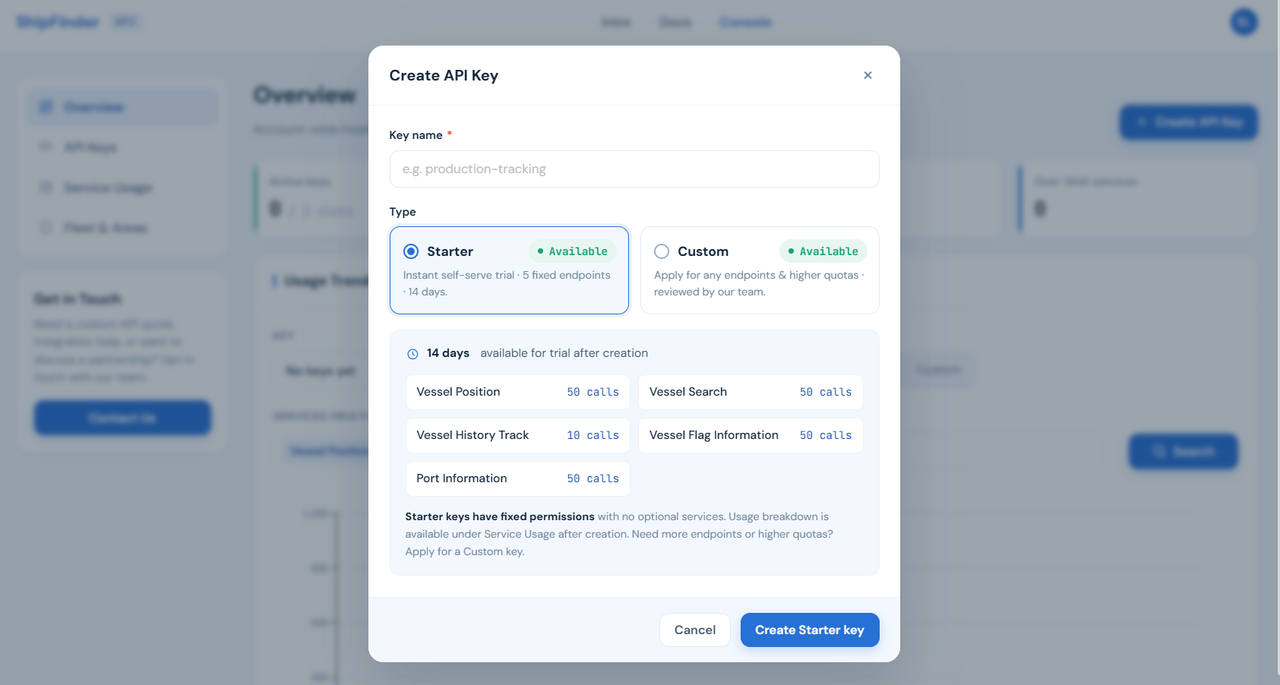
Test with vessels relevant to your operations and check whether the returned data meets your needs. For additional services, higher quotas or push subscriptions, apply for a Custom Key. The ShipFinder team must confirm your requirements and activate the requested services before you use them.
Follow the API integration guide for account setup, key creation and your first requests.
Select the API Services Your Workflow Needs
Select the data and updates your team needs for day-to-day fleet monitoring.
| API service | How your team can use it |
|---|---|
| Real-time Vessel Positions | Display the real-time positions vessels in your internal system |
| ETA | Check estimated arrival times and remaining distances against voyage plans |
| Historical Tracks and Port Calls | Check previous movements and port visits when reviewing a voyage |
| Vessel and Event Push Services | Receive arrival and departure updates, ETA updates, speed alerts, geofence notifications, and more |
See the ShipFinder API documentation for available services, request parameters and response examples.
Set Up Fleet Queries and Push Updates
There are two ways to bring data into your system:
Query data when needed: Request positions, ETA information, historical records or other data for a dashboard or operational check.
Receive subscribed updates: Configure push services to receive updates or event notifications for the vessels you monitor.
Choose Online Monitoring, API Integration — or Both
The right approach depends on where your team uses vessel information and how it handles updates.
| Your workflow | Suggested approach |
|---|---|
| Your team checks vessel positions on a map and follows email alerts | ShipFinder web platform |
| You need vessel positions and voyage updates in your internal systems | API integration |
| Your team uses the map while other systems also need vessel data | Web platform and API integration |
Web subscriptions and API services are provided separately; API access is not included in a web subscription. When choosing a setup, consider how many people need simultaneous access, which data you need and whether you require integration with internal systems. View ShipFinder's subscription and API information.
Start Monitoring Your Commercial Fleet
Open ShipFinder to monitor your vessels online, or explore the AIS API to bring vessel updates into your internal systems.
Contact our team at shipfinder@elaneglobal.com to discuss your fleet, the data you need and how you plan to use it.